What is a Smart Action?
Sooner or later, you will need to perform actions on your data that are specific to your business. Moderating comments, generating an invoice, logging into a customer’s account or banning a user are exactly the kind of important tasks to unlock in order to manage your day-to-day operations.
On our Live Demo example, our companies collection has many examples of Smart Action. The simplest one is Mark as live.
If you’re looking for information on native actions (CRUD), check out this page.
Creating a Smart action
In order to create a Smart action, you will first need to declare it in your code for a specific collection. Here we declare a Mark as Live Smart action for the companies collection.
const { collection } = require('forest-express-sequelize');
collection('companies', {
actions: [
{
name: 'Mark as Live',
},
],
});
const { collection } = require('forest-express-mongoose');
collection('companies', {
actions: [
{
name: 'Mark as Live',
},
],
});
req.user
req.user content example
{
"id": "172",
"email": "angelicabengtsson@doha2019.com",
"firstName": "Angelica",
"lastName": "Bengtsson",
"team": "Pole Vault",
"role": "Manager",
"tags": [{ key: "country", value: "Canada" }],
"renderingId": "4998",
"iat": 1569913709,
"exp": 1571123309
}
req.body
You can find important information in the body of the request.
This is particularly useful to find the context in which an action was performed via a relationship.
{
data: {
attributes: {
collection_name: 'users', //collection on which the action has been triggered
values: {},
ids: [Array], //IDs of selected records
parent_collection_name: 'companies', //Parent collection name
parent_collection_id: '1', //Parent collection id
parent_association_name: 'users', //Name of the association
all_records: false,
all_records_subset_query: {},
all_records_ids_excluded: [],
smart_action_id: 'users-reset-password'
},
type: 'custom-action-requests'
}
}
Customizing response
Default success notification
Returning a 204 status code to the HTTP request of the Smart Action shows the default notification message in the browser.
On our Live Demo example, if our Smart Action Mark as Live route is implemented like this:

...
router.post('/actions/mark-as-live', permissionMiddlewareCreator.smartAction(), (req, res) => {
// ...
res.status(204).send();
});
...
We will see a success message in the browser:
Custom success notification
If we return a 200 status code with an object { success: '...' } as the payload like this…
...
router.post('/actions/mark-as-live', permissionMiddlewareCreator.smartAction(), (req, res) => {
// ...
res.send({ success: 'Company is now live!' });
});
...
...
router.post('/actions/mark-as-live', permissionMiddlewareCreator.smartAction(), (req, res) => {
// ...
res.send({ success: 'Company is now live!' });
});
...
class Forest::CompaniesController < ForestLiana::SmartActionsController
def mark_as_live
# ...
render json: { success: 'Company is now live!' }
end
end
… the success notification will look like this:
Custom error notification
Finally, returning a 400 status code allows you to return errors properly.
...
router.post('/actions/mark-as-live', permissionMiddlewareCreator.smartAction(), (req, res) => {
// ...
res.status(400).send({ error: 'The company was already live!' });
});
...
...
router.post('/actions/mark-as-live', permissionMiddlewareCreator.smartAction(), (req, res) => {
// ...
res.status(400).send({ error: 'The company was already live!' });
});
...
class Forest::CompaniesController < ForestLiana::SmartActionsController
def mark_as_live
# ...
render status: 400, json: { error: 'The company was already live!' }
end
end
Custom HTML response
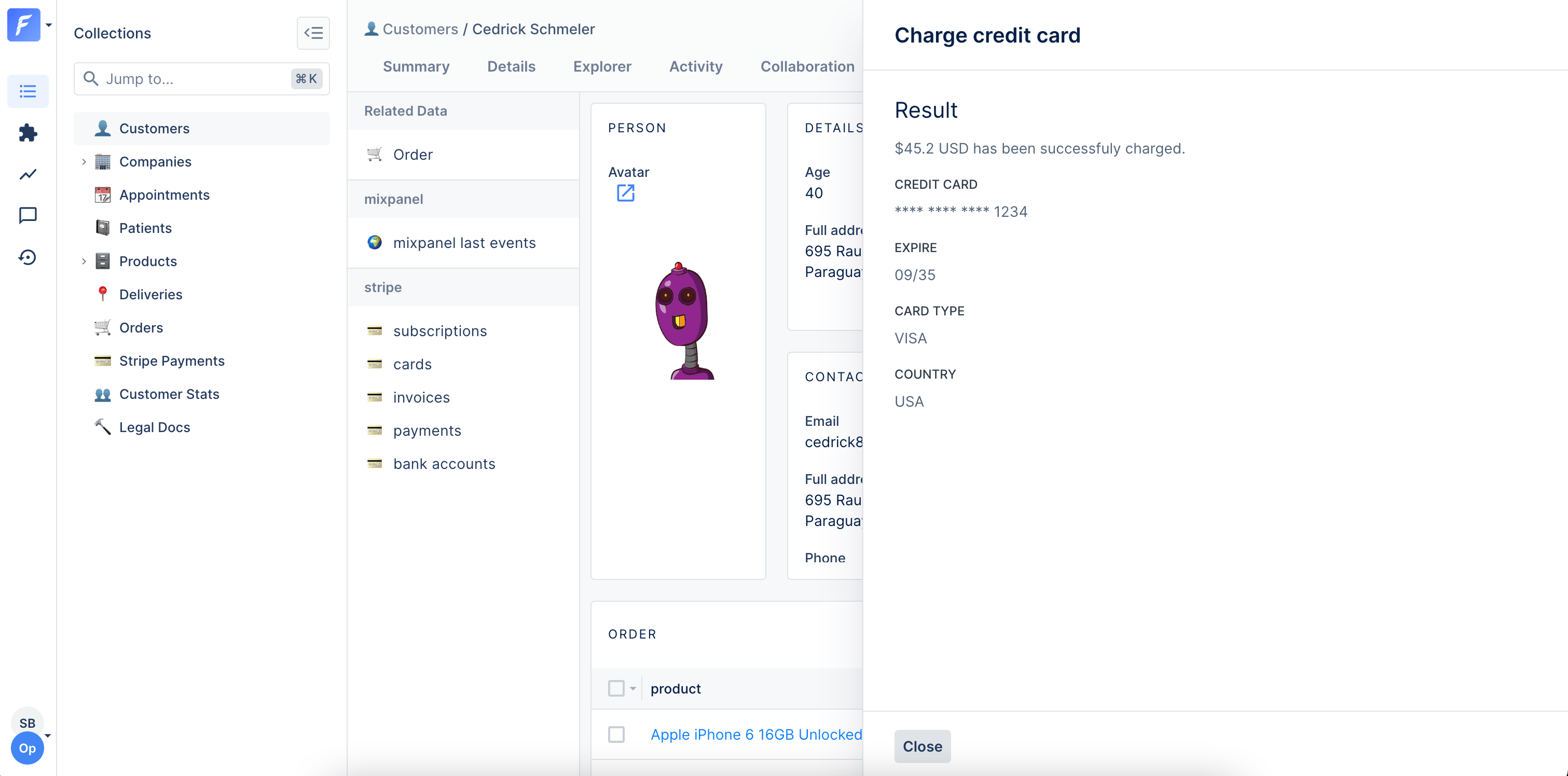
You can also return a HTML page as a response to give more feedback to the admin user who has triggered your Smart Action. To do this, you just need to return a 200 status code with an object { html: '...' }.
On our Live Demo example, we’ve created a Charge credit card Smart Action on the Collection customersthat returns a custom HTML response.
const { collection } = require('forest-express-sequelize');
collection('customers', {
actions: [
{
name: 'Charge credit card',
type: 'single',
fields: [
{
field: 'amount',
isRequired: true,
description:
'The amount (USD) to charge the credit card. Example: 42.50',
type: 'Number',
},
{
field: 'description',
isRequired: true,
description:
'Explain the reason why you want to charge manually the customer here',
type: 'String',
},
],
},
],
});
...
const stripe = require('stripe')(process.env.STRIPE_SECRET_KEY);
router.post('/actions/charge-credit-card', permissionMiddlewareCreator.smartAction(), (req, res) => {
let customerId = req.body.data.attributes.ids[0];
let amount = req.body.data.attributes.values.amount * 100;
let description = req.body.data.attributes.values.description;
return customers
.findByPk(customerId)
.then((customer) => {
return stripe.charges.create({
amount: amount,
currency: 'usd',
customer: customer.stripe_id,
description: description
});
})
.then((response) => {
res.send({
html: `
<p class="c-clr-1-4 l-mt l-mb">\$${response.amount / 100} USD has been successfully charged.</p>
<strong class="c-form__label--read c-clr-1-2">Credit card</strong>
<p class="c-clr-1-4 l-mb">**** **** **** ${response.source.last4}</p>
<strong class="c-form__label--read c-clr-1-2">Expire</strong>
<p class="c-clr-1-4 l-mb">${response.source.exp_month}/${response.source.exp_year}</p>
<strong class="c-form__label--read c-clr-1-2">Card type</strong>
<p class="c-clr-1-4 l-mb">${response.source.brand}</p>
<strong class="c-form__label--read c-clr-1-2">Country</strong>
<p class="c-clr-1-4 l-mb">${response.source.country}</p>
`
});
});
});
...
module.exports = router;
const { collection } = require('forest-express-mongoose');
collection('Customer', {
actions: [
{
name: 'Charge credit card',
type: 'single',
fields: [
{
field: 'amount',
isRequired: true,
description:
'The amount (USD) to charge the credit card. Example: 42.50',
type: 'Number',
},
{
field: 'description',
isRequired: true,
description:
'Explain the reason why you want to charge manually the customer here',
type: 'String',
},
],
},
],
});
...
const stripe = require('stripe')(process.env.STRIPE_SECRET_KEY);
router.post('/actions/charge-credit-card', (req, res) => {
let customerId = req.body.data.attributes.ids[0];
let amount = req.body.data.attributes.values.amount * 100;
let description = req.body.data.attributes.values.description;
return Customer
.findById(customerId)
.then((customer) => {
return stripe.charges.create({
amount: amount,
currency: 'usd',
customer: customer.stripe_id,
description: description
});
})
.then((response) => {
res.send({
html: `
<p class="c-clr-1-4 l-mt l-mb">\$${response.amount / 100} USD has been successfully charged.</p>
<strong class="c-form__label--read c-clr-1-2">Credit card</strong>
<p class="c-clr-1-4 l-mb">**** **** **** ${response.source.last4}</p>
<strong class="c-form__label--read c-clr-1-2">Expire</strong>
<p class="c-clr-1-4 l-mb">${response.source.exp_month}/${response.source.exp_year}</p>
<strong class="c-form__label--read c-clr-1-2">Card type</strong>
<p class="c-clr-1-4 l-mb">${response.source.brand}</p>
<strong class="c-form__label--read c-clr-1-2">Country</strong>
<p class="c-clr-1-4 l-mb">${response.source.country}</p>
`
});
});
});
...
module.exports = router;
class Forest::Customer
include ForestLiana::Collection
collection :Customer
action 'Charge credit card', type: 'single', fields: [{
field: 'amount',
is_required: true,
description: 'The amount (USD) to charge the credit card. Example: 42.50',
type: 'Number'
}, {
field: 'description',
is_required: true,
description: 'Explain the reason why you want to charge manually the customer here',
type: 'String'
}]
end
Rails.application.routes.draw do
# MUST be declared before the mount ForestLiana::Engine.
namespace :forest do
post '/actions/charge-credit-card' => 'customers#charge_credit_card'
end
mount ForestLiana::Engine => '/forest'
end
class Forest::CustomersController < ForestLiana::SmartActionsController
def charge_credit_card
customer_id = ForestLiana::ResourcesGetter.get_ids_from_request(params).first
amount = params.dig('data', 'attributes', 'values', 'amount').to_i
description = params.dig('data', 'attributes', 'values', 'description')
customer = Customer.find(customer_id)
response = Stripe::Charge.create(
amount: amount * 100,
currency: 'usd',
customer: customer.stripe_id,
description: description
)
render json: { html: <<EOF
<p class="c-clr-1-4 l-mt l-mb">$#{response.amount / 100.0} USD has been successfully charged.</p>
<strong class="c-form__label--read c-clr-1-2">Credit card</strong>
<p class="c-clr-1-4 l-mb">**** **** **** #{response.source.last4}</p>
<strong class="c-form__label--read c-clr-1-2">Expire</strong>
<p class="c-clr-1-4 l-mb">#{response.source.exp_month}/#{response.source.exp_year}</p>
<strong class="c-form__label--read c-clr-1-2">Card type</strong>
<p class="c-clr-1-4 l-mb">#{response.source.brand}</p>
<strong class="c-form__label--read c-clr-1-2">Country</strong>
<p class="c-clr-1-4 l-mb">#{response.source.country}</p>
EOF
}
end
end
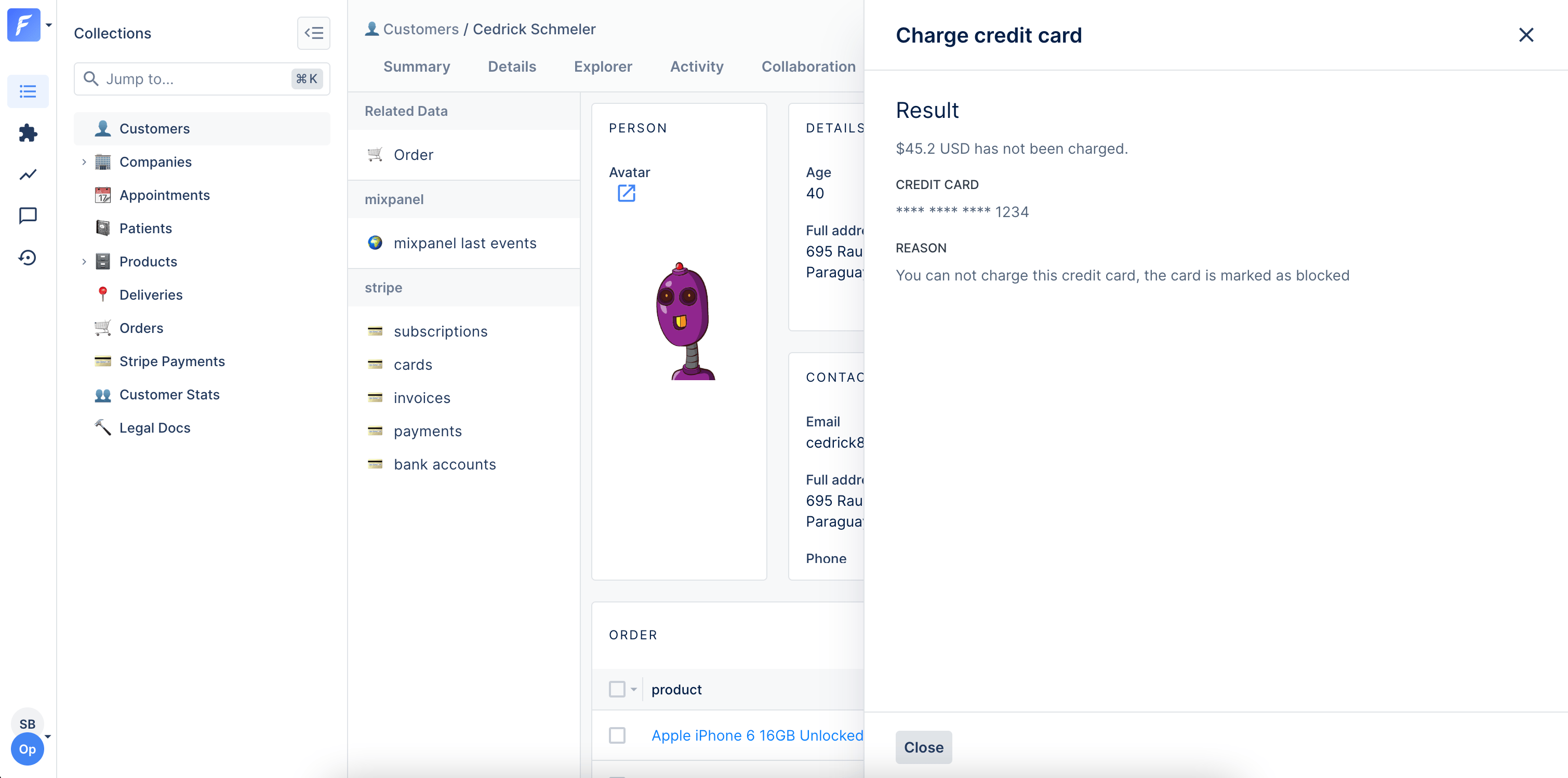
You can either respond with an HTML page in case of error. The user will be able to go back to his smart action’s form by using the cross icon at the top right of the panel.
const { collection } = require('forest-express-sequelize');
collection('customers', {
actions: [
{
name: 'Charge credit card',
type: 'single',
fields: [
{
field: 'amount',
isRequired: true,
description:
'The amount (USD) to charge the credit card. Example: 42.50',
type: 'Number',
},
{
field: 'description',
isRequired: true,
description:
'Explain the reason why you want to charge manually the customer here',
type: 'String',
},
],
},
],
});
...
const stripe = require('stripe')(process.env.STRIPE_SECRET_KEY);
router.post('/actions/charge-credit-card', permissionMiddlewareCreator.smartAction(), (req, res) => {
let customerId = req.body.data.attributes.ids[0];
let amount = req.body.data.attributes.values.amount * 100;
let description = req.body.data.attributes.values.description;
return customers
.findByPk(customerId)
.then((customer) => {
return stripe.charges.create({
amount: amount,
currency: 'usd',
customer: customer.stripe_id,
description: description
});
})
.then((response) => {
res.status(400).send({
html: `
<p class="c-clr-1-4 l-mt l-mb">$${response.amount / 100} USD has not been charged.</p>
<strong class="c-form__label--read c-clr-1-2">Credit card</strong>
<p class="c-clr-1-4 l-mb">**** **** **** ${response.source.last4}</p>
<strong class="c-form__label--read c-clr-1-2">Reason</strong>
<p class="c-clr-1-4 l-mb">You can not charge this credit card. The card is marked as blocked</p>
`
});
});
});
...
module.exports = router;
const { collection } = require('forest-express-mongoose');
collection('Customer', {
actions: [
{
name: 'Charge credit card',
type: 'single',
fields: [
{
field: 'amount',
isRequired: true,
description:
'The amount (USD) to charge the credit card. Example: 42.50',
type: 'Number',
},
{
field: 'description',
isRequired: true,
description:
'Explain the reason why you want to charge manually the customer here',
type: 'String',
},
],
},
],
});
...
const stripe = require('stripe')(process.env.STRIPE_SECRET_KEY);
router.post('/actions/charge-credit-card', (req, res) => {
let customerId = req.body.data.attributes.ids[0];
let amount = req.body.data.attributes.values.amount * 100;
let description = req.body.data.attributes.values.description;
return Customer
.findById(customerId)
.then((customer) => {
return stripe.charges.create({
amount: amount,
currency: 'usd',
customer: customer.stripe_id,
description: description
});
})
.then((response) => {
res.status(400).send({
html: `
<p class="c-clr-1-4 l-mt l-mb">\$${response.amount / 100} USD has not been charged.</p>
<strong class="c-form__label--read c-clr-1-2">Credit card</strong>
<p class="c-clr-1-4 l-mb">**** **** **** ${record.source.last4}</p>
<strong class="c-form__label--read c-clr-1-2">Reason</strong>
<p class="c-clr-1-4 l-mb">You can not charge this credit card. The card is marked as blocked</p>
`
});
});
});
...
module.exports = router;
class Forest::Customer
include ForestLiana::Collection
collection :Customer
action 'Charge credit card', type: 'single', fields: [{
field: 'amount',
is_required: true,
description: 'The amount (USD) to charge the credit card. Example: 42.50',
type: 'Number'
}, {
field: 'description',
is_required: true,
description: 'Explain the reason why you want to charge manually the customer here',
type: 'String'
}]
end
Rails.application.routes.draw do
# MUST be declared before the mount ForestLiana::Engine.
namespace :forest do
post '/actions/charge-credit-card' => 'customers#charge_credit_card'
end
mount ForestLiana::Engine => '/forest'
end
/app/controllers/forest/customers_controller.rb
class Forest::CustomersController < ForestLiana::SmartActionsController
def charge_credit_card
customer_id = ForestLiana::ResourcesGetter.get_ids_from_request(params, forest_user).first
amount = params.dig('data', 'attributes', 'values', 'amount').to_i
description = params.dig('data', 'attributes', 'values', 'description')
customer = Customer.find(customer_id)
response = Stripe::Charge.create(
amount: amount * 100,
currency: 'usd',
customer: customer.stripe_id,
description: description
)
render status: 400, json: {
html: <<EOF
<p class="c-clr-1-4 l-mt l-mb">\$#{record.amount / 100} USD has not been charged.</p>
<strong class="c-form__label--read c-clr-1-2">Credit card</strong>
<p class="c-clr-1-4 l-mb">**** **** **** #{record.source.last4}</p>
<strong class="c-form__label--read c-clr-1-2">Reason</strong>
<p class="c-clr-1-4 l-mb">You can not charge this credit card. The card is marked as blocked</p>
EOF
}
end
end
Setting up a webhook
After a smart action you can set up a HTTP (or HTTPS) callback - a webhook - to forward information to other applications.
To set up a webhook all you have to do is to add a webhookobject in the response of your action.
SQL
Mongoose
Rails
Django
Laravel
response.send({
webhook: {
// This is the object that will be used to fire http calls.
url: 'http://my-company-name', // The url of the company providing the service.
method: 'POST', // The method you would like to use (typically a POST).
headers: {}, // You can add some headers if needed (you can remove it).
body: {
// A body to send to the url (only JSON supported).
adminToken: 'your-admin-token',
},
},
});
response.send({
webhook: {
// This is the object that will be used to fire http calls.
url: 'http://my-company-name', // The url of the company providing the service.
method: 'POST', // The method you would like to use (typically a POST).
headers: {}, // You can add some headers if needed (you can remove it).
body: {
// A body to send to the url (only JSON supported).
adminToken: 'your-admin-token',
},
},
});
render json: {
webhook: { # This is the object that will be used to fire http calls.
url: 'http://my-company-name', # The url of the company providing the service.
method: 'POST', # The method you would like to use (typically a POST).
headers: {}, # You can add some headers if needed (you can remove it).
body: { # A body to send to the url (only JSON supported).
adminToken: 'your-admin-token',
}
}
}
from django_forest.utils.collection import Collection
from app.models import Customer
class CustomerForest(Collection):
def load(self):
self.actions = [{
'name': 'Generate invoice',
'download': True
}]
Collection.register(CustomerForest, Customer)
On our Live Demo, the collection Customer has a Smart Action Generate invoice. In this use case, we want to download the generated PDF invoice after clicking on the action. To indicate a Smart Action returns something to download, you have to enable the option download.
If you want to create an action accessible from the details or the summary view of a record involving related data, this section may interest you.
In the example below, the “Add new transaction” action is accessible from the summary view. This action creates a new transaction and automatically refreshes the “Emitted transactions” related data section to see the new transaction.
SQL
Mongoose
Rails
Django
Laravel
Below is the sample code. We use faker to generate random data in our example. Remember to install it if you wish to use it (npm install faker).const { collection } = require('forest-express-sequelize');
collection('companies', {
actions: [
{
name: 'Add new transaction',
description: 'Name of the company who will receive the transaction.',
fields: [
{
field: 'Beneficiary company',
description: 'Name of the company who will receive the transaction.',
reference: 'companies.id',
},
{
field: 'Amount',
type: 'Number',
},
],
},
],
});
...
const faker = require('faker');
router.post('/actions/add-new-transaction', permissionMiddlewareCreator.smartAction(),
(req, res) => {
let emitterCompanyId = req.body.data.attributes.ids[0]
let beneficiaryCompanyId = req.body.data.attributes.values['Beneficiary company']
let amount = req.body.data.attributes.values['Amount']
return transactions
.create({
emitter_company_id: emitterCompanyId,
beneficiary_company_id: beneficiaryCompanyId,
beneficiary_iban: faker.finance.iban(),
emitter_iban: faker.finance.iban(),
vat_amount: faker.finance.amount(500, 10000, 0),
fee_amount: faker.finance.amount(500, 10000, 0),
status: ['to_validate', 'validated', 'rejected'].sample,
note: faker.lorem.sentences(),
amount: amount,
emitter_bic: faker.finance.bic(),
beneficiary_bic: faker.finance.bic()
})
.then(() => {
// the code below automatically refresh the related data
// 'emitted_transactions' on the Companies' Summary View
// after submitting the Smart action form.
res.send({
success: 'New transaction emitted',
refresh: { relationships: ['emitted_transactions'] },
});
});
});
Below is the sample code. We use faker to generate random data in our example. Remember to install it if you wish to use it (npm install faker).const { collection } = require('forest-express-mongoose');
collection('Company', {
actions: [
{
name: 'Add new transaction',
description: 'Name of the company who will receive the transaction.',
fields: [
{
field: 'Beneficiary company',
description: 'Name of the company who will receive the transaction.',
reference: 'Company',
},
{
field: 'Amount',
type: 'Number',
},
],
},
],
});
const express = require('express');
const router = express.Router();
const Liana = require('forest-express-mongoose');
const Transaction = require('../models/transactions');
const faker = require('faker');
// ...
router.post(
'/actions/add-new-transaction',
Liana.ensureAuthenticated,
(req, res) => {
let emitterCompanyId = req.body.data.attributes.ids[0];
let beneficiaryCompanyId =
req.body.data.attributes.values['Beneficiary company'];
let amount = req.body.data.attributes.values['Amount'];
return Transaction.create({
emitter_company_id: emitterCompanyId,
beneficiary_company_id: beneficiaryCompanyId,
beneficiary_iban: faker.finance.iban(),
emitter_iban: faker.finance.iban(),
vat_amount: faker.finance.amount(500, 10000, 0),
fee_amount: faker.finance.amount(500, 10000, 0),
status: ['to_validate', 'validated', 'rejected'].sample,
note: faker.lorem.sentences(),
amount: amount,
emitter_bic: faker.finance.bic(),
beneficiary_bic: faker.finance.bic(),
}).then(() => {
// the code below automatically refresh the related data
// 'emitted_transactions' on the Companies' Summary View
// after submitting the Smart action form.
res.send({
success: 'New transaction emitted',
refresh: { relationships: ['emitted_transactions'] },
});
});
}
);
Below is the sample code. We use the gem 'faker' to easily generate fake data. Remember to add this gem to your Gemfile and install it (bundle install) if you wish to use it.class Forest::Company
include ForestLiana::Collection
collection :Company
# ...
action 'Add new transaction', fields: [{
field: 'Beneficiary company',
description: 'Name of the company who will receive the transaction.',
reference: 'Company.id'
}, {
field: 'Amount',
type: 'Number'
}]
# ...
end
class Forest::CompaniesController < ForestLiana::SmartActionsController
# ...
def add_new_transaction
attrs = params.dig('data','attributes', 'values')
beneficiary_company_id = attrs['Beneficiary company']
emitter_company_id = ForestLiana::ResourcesGetter.get_ids_from_request(params, forest_user).first
amount = attrs['Amount']
Transaction.create!(
emitter_company_id: emitter_company_id,
beneficiary_company_id: beneficiary_company_id,
beneficiary_iban: Faker::Code.imei,
emitter_iban: Faker::Code.imei,
vat_amount: Faker::Number.number(4),
fee_amount: Faker::Number.number(4),
status: ['to_validate', 'validated', 'rejected'].sample,
note: Faker::Lorem.paragraph,
amount: amount,
emitter_bic: Faker::Code.nric,
beneficiary_bic: Faker::Code.nric
)
# the code below automatically refresh the related data
# 'emitted_transactions' on the Companies' Summary View
# after submitting the Smart action form.
render json: {
success: 'New transaction emitted',
refresh: { relationships: ['emitted_transactions'] },
}
end
end
Rails.application.routes.draw do
# MUST be declared before the mount ForestLiana::Engine.
namespace :forest do
# ...
post '/actions/add-new-transaction' => 'companies#add_new_transaction'
# ...
end
mount ForestLiana::Engine => '/forest'
# For details on the DSL available within this file, see http://guides.rubyonrails.org/routing.html
end
Below is the sample code. We use the python Faker package to easily generate fake data. Remember to add this package to your requirements.txt and install it if you wish to use it.
Below is the sample code. We use the Faker package to easily generate fake data. Remember to add this package to your composer.json and install it if you wish to use it.
Redirecting to a different page on success
To streamline your operation workflow, it could make sense to redirect to another page after a Smart action was successfully executed.
It is possible using the redirectTo property.
The redirection works both for internal (*.forestadmin.com pages) and external links.
External links will open in a new tab.
Here’s a working example for both cases:
const { collection } = require('forest-express-sequelize');
collection('models', {
actions: [
{
name: 'Return and track',
},
{
name: 'Show some activity',
},
],
});
...
// External redirection
router.post('/actions/return-and-track', permissionMiddlewareCreator.smartAction(),
(req, res) => {
res.send({
success: 'Return initiated successfully.',
redirectTo: 'https://www.royalmail.com/portal/rm/track?trackNumber=ZW924750388GB',
});
}
);
// Internal redirection
router.post('/actions/show-some-activity', permissionMiddlewareCreator.smartAction(),
(req, res) => {
res.send({
success: 'Navigated to the activity view.',
redirectTo: '/MyProject/MyEnvironment/MyTeam/data/20/index/record/20/108/activity',
});
}
);
...
module.exports = router;
const { collection } = require('forest-express-mongoose');
collection('models', {
actions: [
{
name: 'Initiate return and display tracking',
},
{
name: 'Show some activity',
},
],
});
...
// External redirection
router.post('/actions/return-and-track', Liana.ensureAuthenticated,
(req, res) => {
res.send({
success: 'Return initiated successfully.',
redirectTo: 'https://www.royalmail.com/portal/rm/track?trackNumber=ZW924750388GB',
});
}
);
// Internal redirection
router.post('/actions/show-some-activity', Liana.ensureAuthenticated,
(req, res) => {
res.send({
success: 'Navigated to the activity view.',
redirectTo: '/1/data/20/index/record/20/108/activity/preview',
});
}
);
...
module.exports = router;
class Forest::Company
include ForestLiana::Collection
collection :Company
action 'Return and track'
action 'Show some activity'
end
...
namespace :forest do
post '/actions/return-and-track' => 'company#redirect_externally'
post '/actions/show-some-activity' => 'company#redirect_internally'
end
...
...
def redirect_externally
# External redirection
render json: {
success: 'Return initiated successfully.',
redirectTo: 'https://www.royalmail.com/portal/rm/track?trackNumber=ZW924750388GB',
}
end
def redirect_internally
# Internal redirection
render json: {
success: 'Return initiated successfully.',
redirectTo: '/MyProject/MyEnvironment/MyTeam/data/20/index/record/20/108/activity',
}
end
...
Your external links must use the http or https protocol.
Enable/Disable a Smart Action according to the state of a record
Sometimes, your Smart Action only makes sense depending on the state of your records. On our Live Demo, it does not make any sense to enable the Mark as Live Smart Action on the companies collection if the company is already live, right? This is configured from the collection’s Smart Action settings.
Restrict a smart action to specific roles
When using Forest collaboratively with clear roles defined it becomes relevant to restrict a smart action only to a select few. This functionality is accessible through Smart Actions Permissions in the Role section of your Project Settings.
Require approval for a Smart action
Critical actions for your business may need approval before being processed. You can require approval per role from the Roles tab of your Project Settings; approval requests are then reviewed from the Collaboration menu.
Want to go further with Smart Actions? Read the next page to discover how to make your Smart Actions even more powerful with Forms!