
What is a Smart Action?

Sooner or later, you will need to perform actions on your data that are specific to your business. Moderating comments, generating an invoice, logging into a customer’s account or banning a user are exactly the kind of important tasks to unlock in order to manage your day-to-day operations. On our Live Demo example, our companies collection has many examples of Smart Action. The simplest one is Mark as live.
If you’re looking for information on native actions (CRUD), check out this page.

Creating a Smart action

In order to create a Smart action, you will first need to declare it in your code for a specific collection. Here we declare a Mark as Live Smart action for the companies collection.
class Forest::Company
  include ForestLiana::Collection

  collection :Company

  action 'Mark as Live'
end
After declaring it, your Smart action will appear in the Smart actions tab within your collection settings.
A Smart action is displayed in the UI only if:
  • it is set as “visible” in the collection settings
    AND
  • in non-development environments, the user’s role must grant the “trigger” permission
At this point, the Smart Action does nothing, because no route in your Admin backend handles the API call yet.
The Smart Action behavior is implemented separately from the declaration. In the following example, we’ve implemented the Mark as live Smart Action, which simply changes a company’s status to live.
The route declaration takes place in config/routes.rb.
Rails.application.routes.draw do
  # MUST be declared before the mount ForestLiana::Engine.
  namespace :forest do
    post '/actions/mark-as-live' => 'companies#mark_as_live'
  end

  mount ForestLiana::Engine => '/forest'
end
The business logic in this Smart Action is extremely simple. We only update here the attribute status of the companies to the value live:
class Forest::CompaniesController < ForestLiana::SmartActionsController
  def mark_as_live
    company_id = ForestLiana::ResourcesGetter.get_ids_from_request(params, forest_user).first
    Company.update(company_id, status: 'live')

    head :no_content
  end
end
You must make sure that all your Smart Actions controllers extend from the ForestLiana::SmartActionsController. This is mandatory to ensure that all features built on top of Smart Actions work as expected (authentication, permissions, approval workflows,…)
You may have to add CORS headers to enable the domain app.forestadmin.com to trigger API call on your Application URL, which is on a different domain name (e.g. localhost:3000).

What’s happening under the hood?

When you trigger the Smart Action from the UI, your browser will make an API call: POST /forest/actions/mark-as-live.
If you want to customize the API call, check the list of available options.
The payload of the HTTP request is based on a JSON API document.
The data.attributes.ids key allows you to retrieve easily the selected records from the UI.
The data.attributes.values key contains all the values of your input fields (handling input values).
Other properties of data.attributes are used to manage the select all behavior.
{
  "data": {
    "attributes": {
      "ids": ["1985"],
      "values": {},
      "collection_name": "companies",
      ...
    },
    "type": "custom-action-requests"
  }
}
Should you want not to use the RecordsGetter and use request attributes directly instead, be very careful about edge cases (related data view, etc).

Available Smart Action options

Here is the list of available options to customize your Smart Action:

Rails

NameTypeDescription
namestringLabel of the action displayed in Forest.
typestring(optional) Type of the action. Can be bulk, global or single. Default is bulk.
fieldsarray of objects(optional) Check the handling input values section.
downloadboolean(optional) If true, the action triggers a file download in the Browser. Default is false
endpointstring(optional) Set the API route to call when clicking on the Smart Action. Default is '/forest/actions/name-of-the-action-dasherized'
http_methodstring(optional) Set the HTTP method to use when clicking on the Smart Action. Default is POST.
descriptionstring(optional) Add a description shown in the smart action form. This supports html tags. ⚠️ only available in forest_liana 9.4.0
submit_button_labelstring(optional) Sets the text written on the submit button at the end of the form. Default value is the Smart Action name. ⚠️ only available in forest_liana 9.4.0
Want to go further with Smart Actions? Read the next page to discover how to make your Smart Actions even more powerful with Forms!

Available Smart Action properties

req.user

The JWT Data Token contains all the details of the requesting user. On any authenticated request to your Admin Backend, you can access them with the variable req.user.
req.user content example

{
  "id": "172",
  "email": "angelicabengtsson@doha2019.com",
  "firstName": "Angelica",
  "lastName": "Bengtsson",
  "team": "Pole Vault",
  "role": "Manager",
  "tags": [{ key: "country", value: "Canada" }],
  "renderingId": "4998",
  "iat": 1569913709,
  "exp": 1571123309
}

req.body

You can find important information in the body of the request.
This is particularly useful to find the context in which an action was performed via a relationship.
{
  data: {
    attributes: {
      collection_name: 'users', //collection on which the action has been triggered
      values: {},
      ids: [Array], //IDs of selected records
      parent_collection_name: 'companies', //Parent collection name
      parent_collection_id: '1', //Parent collection id
      parent_association_name: 'users', //Name of the association
      all_records: false,
      all_records_subset_query: {},
      all_records_ids_excluded: [],
      smart_action_id: 'users-reset-password'
    },
    type: 'custom-action-requests'
  }
}

Customizing response

Default success notification

Returning a 204 status code to the HTTP request of the Smart Action shows the default notification message in the browser. On our Live Demo example, if our Smart Action Mark as Live route is implemented like this:

...

router.post('/actions/mark-as-live', permissionMiddlewareCreator.smartAction(), (req, res) => {
  // ...
  res.status(204).send();
});

...
We will see a success message in the browser:

Custom success notification

If we return a 200 status code with an object { success: '...' } as the payload like this…

class Forest::CompaniesController < ForestLiana::SmartActionsController
  def mark_as_live
    # ...
    render json: { success: 'Company is now live!' }
  end
end
… the success notification will look like this:

Custom error notification

Finally, returning a 400 status code allows you to return errors properly.

class Forest::CompaniesController < ForestLiana::SmartActionsController
  def mark_as_live
    # ...
    render status: 400, json: { error: 'The company was already live!' }
  end
end

Custom HTML response

You can also return a HTML page as a response to give more feedback to the admin user who has triggered your Smart Action. To do this, you just need to return a 200 status code with an object { html: '...' }. On our Live Demo example, we’ve created a Charge credit card Smart Action on the Collection customersthat returns a custom HTML response.
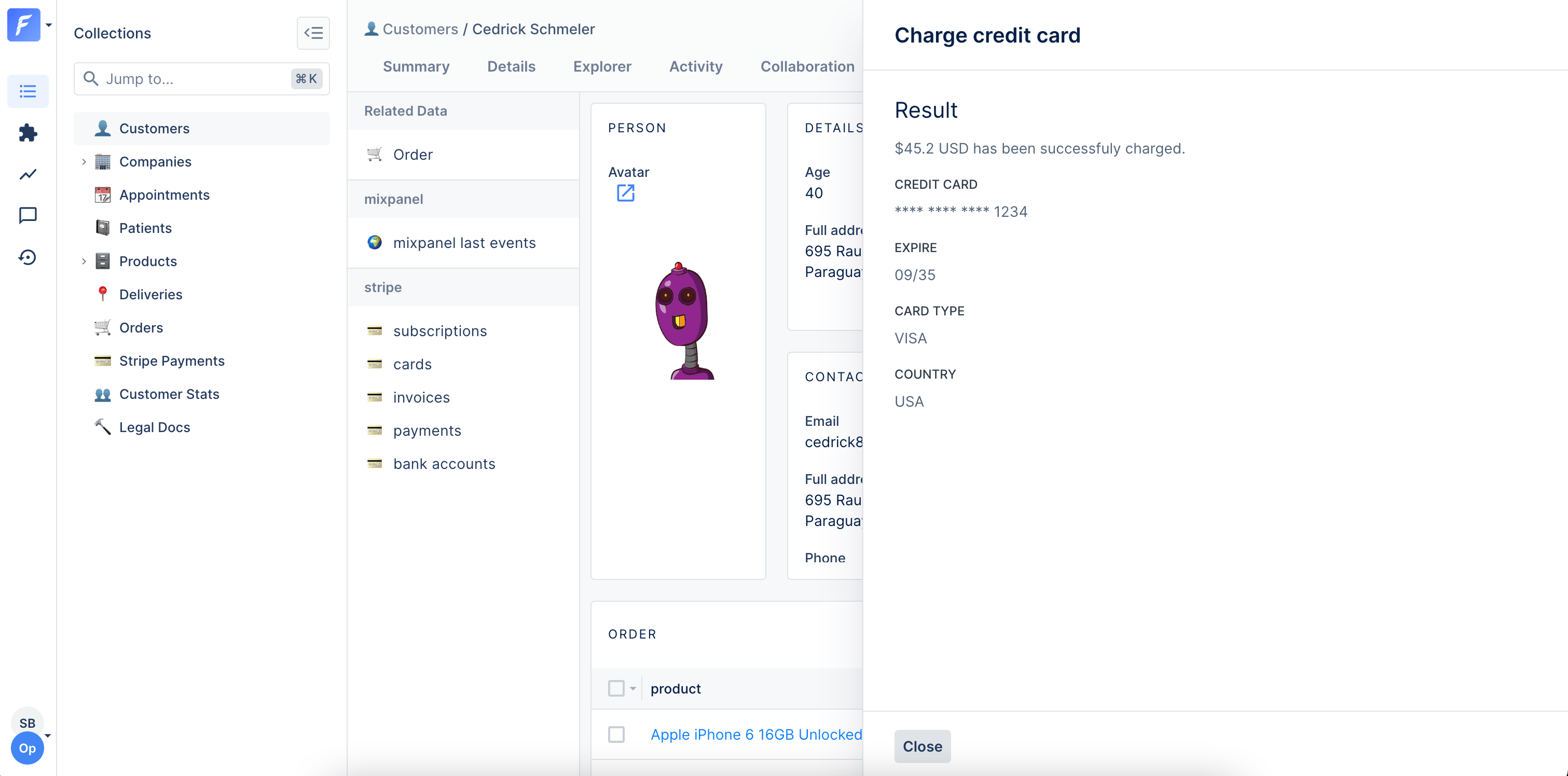
class Forest::Customer
  include ForestLiana::Collection

  collection :Customer

  action 'Charge credit card', type: 'single', fields: [{
    field: 'amount',
    is_required: true,
    description: 'The amount (USD) to charge the credit card. Example: 42.50',
    type: 'Number'
  }, {
    field: 'description',
    is_required: true,
    description: 'Explain the reason why you want to charge manually the customer here',
    type: 'String'
  }]
end
Rails.application.routes.draw do
  # MUST be declared before the mount ForestLiana::Engine.
  namespace :forest do
    post '/actions/charge-credit-card' => 'customers#charge_credit_card'
  end

  mount ForestLiana::Engine => '/forest'
end
class Forest::CustomersController < ForestLiana::SmartActionsController
  def charge_credit_card
    customer_id = ForestLiana::ResourcesGetter.get_ids_from_request(params).first
    amount = params.dig('data', 'attributes', 'values', 'amount').to_i
    description = params.dig('data', 'attributes', 'values', 'description')

    customer = Customer.find(customer_id)

    response = Stripe::Charge.create(
      amount: amount * 100,
      currency: 'usd',
      customer: customer.stripe_id,
      description: description
    )

    render json: { html: <<EOF
<p class="c-clr-1-4 l-mt l-mb">$#{response.amount / 100.0} USD has been successfully charged.</p>

<strong class="c-form__label--read c-clr-1-2">Credit card</strong>
<p class="c-clr-1-4 l-mb">**** **** **** #{response.source.last4}</p>

<strong class="c-form__label--read c-clr-1-2">Expire</strong>
<p class="c-clr-1-4 l-mb">#{response.source.exp_month}/#{response.source.exp_year}</p>

<strong class="c-form__label--read c-clr-1-2">Card type</strong>
<p class="c-clr-1-4 l-mb">#{response.source.brand}</p>

<strong class="c-form__label--read c-clr-1-2">Country</strong>
<p class="c-clr-1-4 l-mb">#{response.source.country}</p>
EOF
    }
  end
end
You can either respond with an HTML page in case of error. The user will be able to go back to his smart action’s form by using the cross icon at the top right of the panel.
class Forest::Customer
  include ForestLiana::Collection

  collection :Customer

  action 'Charge credit card', type: 'single', fields: [{
    field: 'amount',
    is_required: true,
    description: 'The amount (USD) to charge the credit card. Example: 42.50',
    type: 'Number'
  }, {
    field: 'description',
    is_required: true,
    description: 'Explain the reason why you want to charge manually the customer here',
    type: 'String'
  }]
end
Rails.application.routes.draw do
  # MUST be declared before the mount ForestLiana::Engine.
  namespace :forest do
    post '/actions/charge-credit-card' => 'customers#charge_credit_card'
  end

  mount ForestLiana::Engine => '/forest'
end
/app/controllers/forest/customers_controller.rb
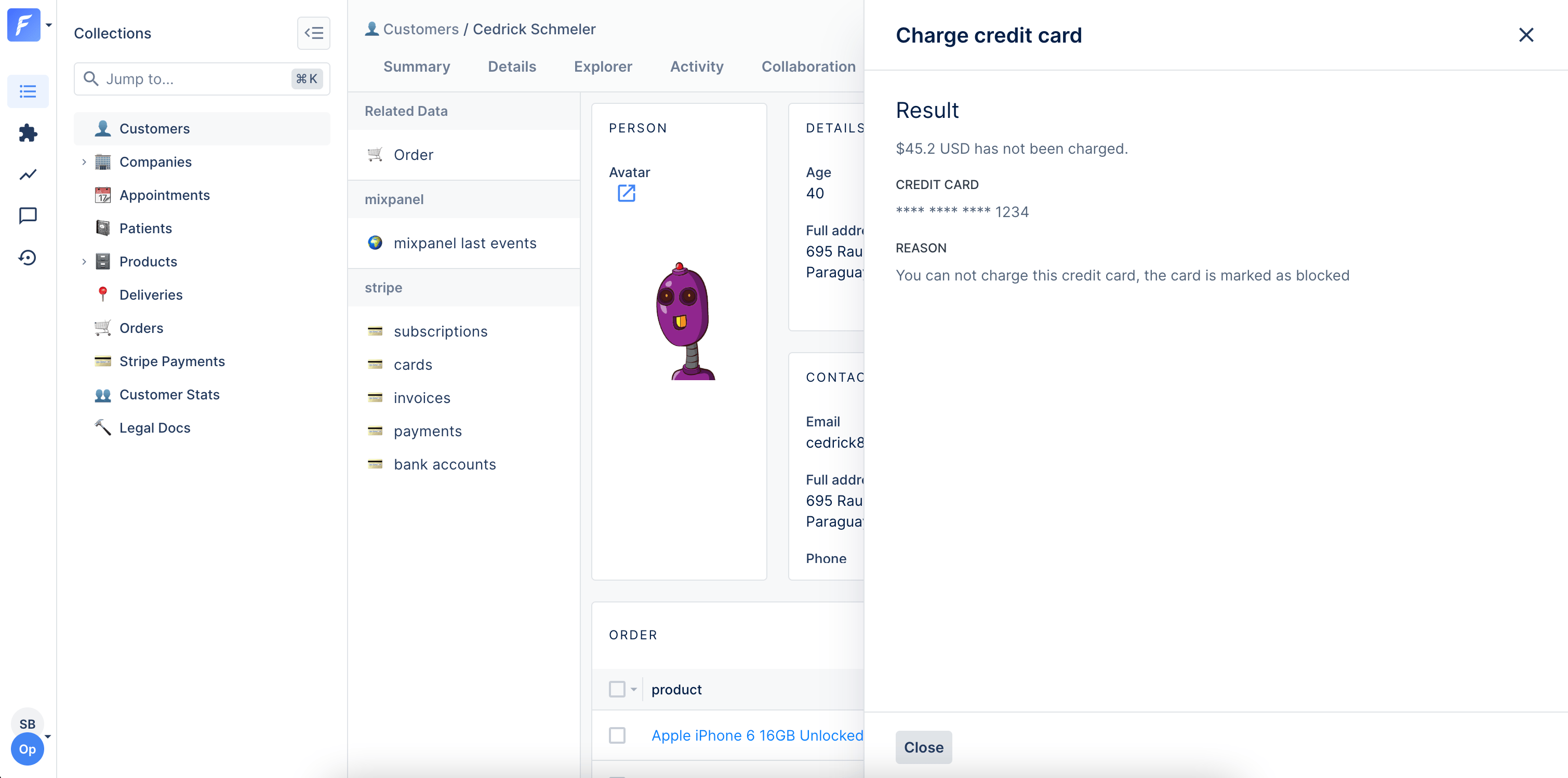
class Forest::CustomersController &#x3C; ForestLiana::SmartActionsController
  def charge_credit_card
    customer_id = ForestLiana::ResourcesGetter.get_ids_from_request(params, forest_user).first
    amount = params.dig('data', 'attributes', 'values', 'amount').to_i
    description = params.dig('data', 'attributes', 'values', 'description')

    customer = Customer.find(customer_id)

    response = Stripe::Charge.create(
      amount: amount * 100,
      currency: 'usd',
      customer: customer.stripe_id,
      description: description
    )

    render status: 400, json: {
      html: &#x3C;&#x3C;EOF
      &#x3C;p class="c-clr-1-4 l-mt l-mb">\$#{record.amount / 100} USD has not been charged.&#x3C;/p>
      &#x3C;strong class="c-form__label--read c-clr-1-2">Credit card&#x3C;/strong>
      &#x3C;p class="c-clr-1-4 l-mb">**** **** **** #{record.source.last4}&#x3C;/p>
      &#x3C;strong class="c-form__label--read c-clr-1-2">Reason&#x3C;/strong>
      &#x3C;p class="c-clr-1-4 l-mb">You can not charge this credit card. The card is marked as blocked&#x3C;/p>
      EOF
    }
  end
end

Setting up a webhook

After a smart action you can set up a HTTP (or HTTPS) callback - a webhook - to forward information to other applications.

To set up a webhook all you have to do is to add a webhookobject in the response of your action.
render json: {
  webhook: { # This is the object that will be used to fire http calls.
    url: 'http://my-company-name', # The url of the company providing the service.
    method: 'POST', # The method you would like to use (typically a POST).
    headers: {}, # You can add some headers if needed (you can remove it).
    body: { # A body to send to the url (only JSON supported).
      adminToken: 'your-admin-token',
    }
  }
}
Webhooks are commonly used to perform smaller requests and tasks, like sending emails or impersonating a user.
Another interesting use of this is automating SSO authentication into your external apps.

Downloading a file

On our Live Demo, the collection Customer has a Smart Action Generate invoice. In this use case, we want to download the generated PDF invoice after clicking on the action. To indicate a Smart Action returns something to download, you have to enable the option download.
Don’t forget to expose the Content-Disposition header in the CORS configuration (as shown in the code below) to be able to customize the filename to download.
class Forest::Customer
  include ForestLiana::Collection

  collection :Customer

  action 'Generate invoice', download: true
end
Rails.application.routes.draw do
  # MUST be declared before the mount ForestLiana::Engine.
  namespace :forest do
    post '/actions/generate-invoice' => 'customers#generate_invoice'
  end

  mount ForestLiana::Engine => '/forest'
end
module LiveDemoRails
  class Application < Rails::Application
    config.middleware.insert_before 0, Rack::Cors do
      allow do
        origins '*'
        resource '*', :headers => :any, :methods => [:get, :post, :options],
        # you MUST expose the Content-Disposition header to customize the file to download.
        expose: ['Content-Disposition']
      end
    end
  end
end
class Forest::CustomersController < ForestLiana::SmartActionsController
  def generate_invoice
    data = open("#{File.dirname(__FILE__)}/../../../public/invoice-2342.pdf" )
    send_data data.read, filename: 'invoice-2342.pdf', type: 'application/pdf', disposition: 'attachment'
  end
end
If you want to create an action accessible from the details or the summary view of a record involving related data, this section may interest you. In the example below, the “Add new transaction” action is accessible from the summary view. This action creates a new transaction and automatically refreshes the “Emitted transactions” related data section to see the new transaction.
Below is the sample code. We use the gem 'faker' to easily generate fake data. Remember to add this gem to your Gemfile and install it (bundle install) if you wish to use it.
class Forest::Company
  include ForestLiana::Collection

  collection :Company
  # ...

  action 'Add new transaction', fields: [{
    field: 'Beneficiary company',
    description: 'Name of the company who will receive the transaction.',
    reference: 'Company.id'
  }, {
    field: 'Amount',
    type: 'Number'
  }]

  # ...
end
class Forest::CompaniesController < ForestLiana::SmartActionsController
  # ...

  def add_new_transaction
    attrs = params.dig('data','attributes', 'values')
    beneficiary_company_id = attrs['Beneficiary company']
    emitter_company_id = ForestLiana::ResourcesGetter.get_ids_from_request(params, forest_user).first
    amount = attrs['Amount']
    Transaction.create!(
      emitter_company_id: emitter_company_id,
      beneficiary_company_id: beneficiary_company_id,
      beneficiary_iban: Faker::Code.imei,
      emitter_iban: Faker::Code.imei,
      vat_amount: Faker::Number.number(4),
      fee_amount: Faker::Number.number(4),
      status: ['to_validate', 'validated', 'rejected'].sample,
      note: Faker::Lorem.paragraph,
      amount: amount,
      emitter_bic: Faker::Code.nric,
      beneficiary_bic: Faker::Code.nric
    )

    # the code below automatically refresh the related data
    # 'emitted_transactions' on the Companies' Summary View
    # after submitting the Smart action form.
    render json: {
      success: 'New transaction emitted',
      refresh: { relationships: ['emitted_transactions'] },
    }
  end
end
Rails.application.routes.draw do
  # MUST be declared before the mount ForestLiana::Engine.
  namespace :forest do
    # ...
    post '/actions/add-new-transaction' => 'companies#add_new_transaction'
    # ...
  end

  mount ForestLiana::Engine => '/forest'
  # For details on the DSL available within this file, see http://guides.rubyonrails.org/routing.html
end

Redirecting to a different page on success

To streamline your operation workflow, it could make sense to redirect to another page after a Smart action was successfully executed.

It is possible using the redirectTo property.

The redirection works both for internal (*.forestadmin.com pages) and external links.
External links will open in a new tab.
Here’s a working example for both cases:
class Forest::Company
  include ForestLiana::Collection

  collection :Company

  action 'Return and track'
  action 'Show some activity'
end
...

namespace :forest do
  post '/actions/return-and-track' => 'company#redirect_externally'
  post '/actions/show-some-activity' => 'company#redirect_internally'
end

...
...

def redirect_externally
  # External redirection
  render json: {
    success: 'Return initiated successfully.',
    redirectTo: 'https://www.royalmail.com/portal/rm/track?trackNumber=ZW924750388GB',
  }
end

def redirect_internally
  # Internal redirection
  render json: {
    success: 'Return initiated successfully.',
    redirectTo: '/MyProject/MyEnvironment/MyTeam/data/20/index/record/20/108/activity',
  }
end

...
Your external links must use the http or https protocol.

Enable/Disable a Smart Action according to the state of a record

Sometimes, your Smart Action only makes sense depending on the state of your records. On our Live Demo, it does not make any sense to enable the Mark as Live Smart Action on the companies collection if the company is already live, right? This is configured from the collection’s Smart Action settings.

Restrict a smart action to specific roles

When using Forest collaboratively with clear roles defined it becomes relevant to restrict a smart action only to a select few. This functionality is accessible through Smart Actions Permissions in the Role section of your Project Settings.

Require approval for a Smart action

Critical actions for your business may need approval before being processed. You can require approval per role from the Roles tab of your Project Settings; approval requests are then reviewed from the Collaboration menu.
Want to go further with Smart Actions? Read the next page to discover how to make your Smart Actions even more powerful with Forms!