We’ve just introduced Smart actions: they’re great because you can execute virtually any business logic. However, there is one big part missing: how do you let your users provide more information or have interaction when they trigger the Smart action? In short, you need to open a Smart Action Form.

Opening a Smart Action Form

Very often, you will need to ask user inputs before triggering the logic behind a Smart Action.
For example, you might want to specify a reason if you want to block a user account. Or set the amount to charge a user’s credit card.
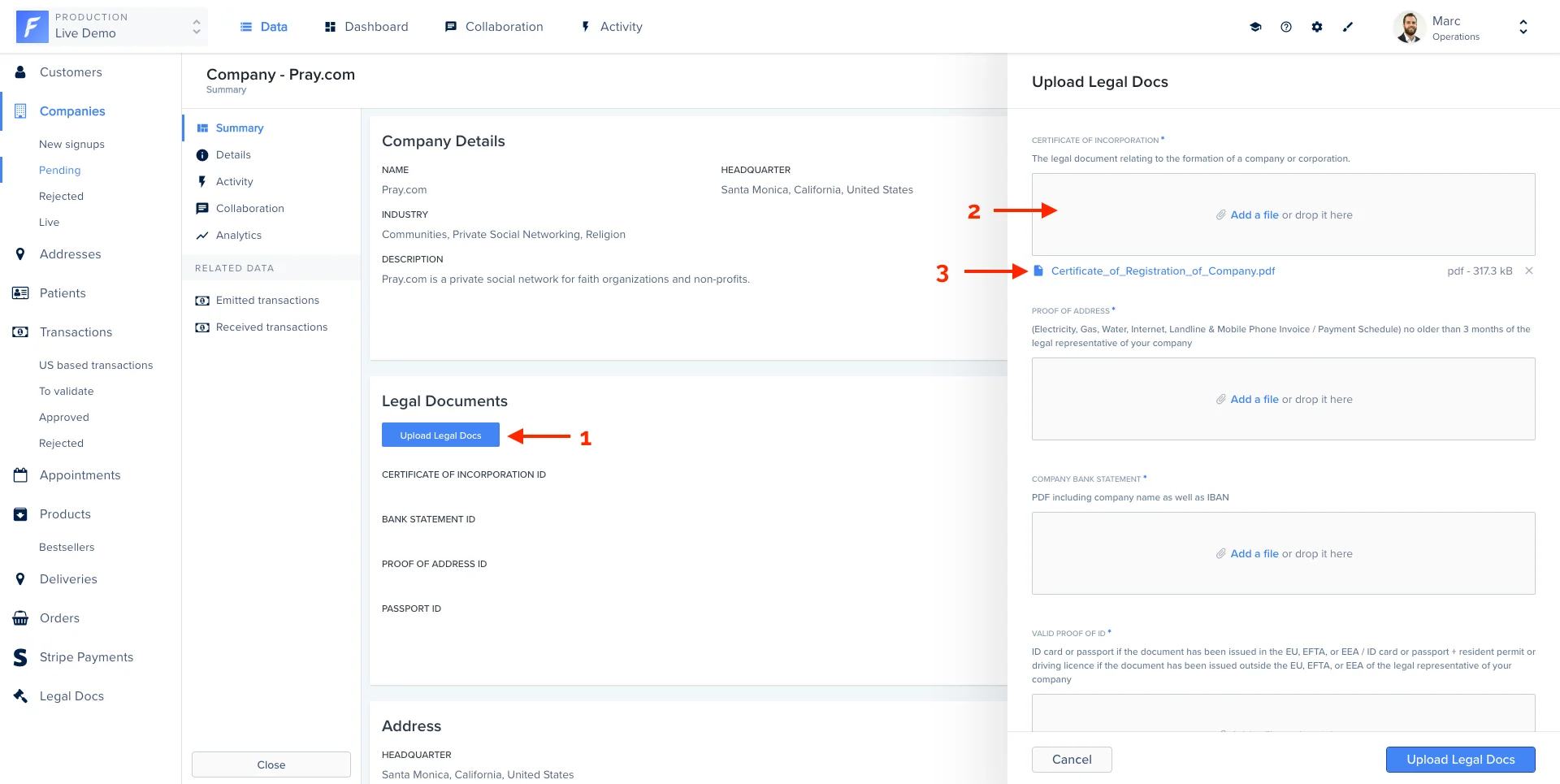
On our Live Demo example, we’ve defined 4 input fields on the Smart Action Upload Legal Docs on the collection Company.
class Forest::Company
  include ForestLiana::Collection

  collection :Company

  action 'Upload Legal Docs', type: 'single', fields: [{
    field: 'Certificate of Incorporation',
    description: 'The legal document relating to the formation of a company or corporation.',
    type: 'File',
    is_required: true
  }, {
    field: 'Proof of address',
    description: '(Electricity, Gas, Water, Internet, Landline & Mobile Phone Invoice / Payment Schedule) no older than 3 months of the legal representative of your company',
    type: 'File',
    is_required: true
  }, {
    field: 'Company bank statement',
    description: 'PDF including company name as well as IBAN',
    type: 'File',
    is_required: true
  }, {
    field: 'Valid proof of ID',
    description: 'ID card or passport if the document has been issued in the EU, EFTA, or EEA / ID card or passport + resident permit or driving license if the document has been issued outside the EU, EFTA, or EEA of the legal representative of your company',
    type: 'File',
    is_required: true
  }]
end
Rails.application.routes.draw do
  # MUST be declared before the mount ForestLiana::Engine.
  namespace :forest do
    post '/actions/upload-legal-docs' => 'companies#upload_legal_docs'
  end

  mount ForestLiana::Engine => '/forest'
end
class Forest::CompaniesController < ForestLiana::SmartActionsController

  def upload_legal_doc(company_id, doc, field)
    id = SecureRandom.uuid

    Forest::S3Helper.new.upload(doc, "livedemo/legal/#{id}")

    company = Company.find(company_id)
    company[field] = id
    company.save

    Document.create({
      file_id: company[field],
      is_verified: true
    })
  end

  def upload_legal_docs
    # Get the current company id
    company_id = ForestLiana::ResourcesGetter.get_ids_from_request(params, forest_user).first

    # Get the values of the input fields entered by the admin user.
    attrs = params.dig('data', 'attributes', 'values')
    certificate_of_incorporation = attrs['Certificate of Incorporation'];
    proof_of_address = attrs['Proof of address'];
    company_bank_statement = attrs['Company bank statement'];
    passport_id = attrs['Valid proof of ID'];

    # The business logic of the Smart Action. We use the function
    # upload_legal_doc to upload them to our S3 repository. You can see the
    # full implementation on our Forest Live Demo repository on Github.
    upload_legal_doc(company_id, certificate_of_incorporation, 'certificate_of_incorporation_id')
    upload_legal_doc(company_id, proof_of_address, 'proof_of_address_id')
    upload_legal_doc(company_id, company_bank_statement, 'bank_statement_id')
    upload_legal_doc(company_id, passport_id, 'passport_id')

    # Once the upload is finished, send a success message to the admin user in the UI.
    render json: { success: 'Legal documents are successfully uploaded.' }
  end
end

Handling input values

Here is the list of available options to customize your input form.
NameTypeDescription
fieldstringLabel of the input field.
typestring or array

Type of your field.

  • string: Boolean, Date, Dateonly, Enum, File, Number, String
  • array: [‘Enum’], [‘Number’], [‘String’]
referencestring(optional) Specify that the input is a reference to another collection. You must specify the primary key (ex: category.id).
enumsarray of strings(optional) Required only for the Enum type. This is where you list all the possible values for your input field.
descriptionstring(optional) Add a description for your admin users to help them fill correctly your form
isRequiredboolean(optional) If true, your input field will be set as required in the browser. Default is false.
hookstring(optional) Specify the change hook. If specified the corresponding hook is called when the input change
widgetstring(optional) The following widgets are available to your smart action fields (text area, date, boolean, file, dateonly)
The widget property is only partially supported. If you want to use a custom widget via a Smart Action Hook, you’ll need to use the syntax mentioned in the next section.

Use components to better layout your form

This feature is only available from version 9.4.0 (forest-express-sequelize and forest-express-mongoose) / version 9.4.0 (forest-rails) .
you must define your layout in a load hook at minima, and repeat it in each change hook.
This feature is useful when dealing with long/complex forms, with many fields. It will let you organize them and add useful information to guide the end user. The layout must contain the fields as they should be rendered on the form.

List of supported layout components

Ruby on Rails

# Page
{
  type: 'Layout',
  component: 'Page',
  elements: [] # An array of fields or other layout elements (except other pages)
},

# Row
{
  type: 'Layout',
  component: 'Row',
  fields: [] # An array of one or two fields
}

# Separator
{
  type: 'Layout',
  component: 'Separator',
}

# Html bloc
{
  type: 'Layout',
  component: 'HtmlBlock',
  content: '...' # A text content, which supports html tags
}

Example

Here’s an example of an action form with many fields, that we want to improve with some layout components, to make it easier for the end user to fill in.

Ruby on Rails

class Forest::Customers
  include ForestLiana::Collection

  collection :Customers

	def self.apply_layout(fields)
	  find_field_by_name = proc { |field_name| fields.find { |field| field[:field] == field_name } }

	  [
		{
		  type: 'Layout',
		  component: 'Page',
		  elements: [
			{
			  type: 'Layout',
			  component: 'HtmlBlock',
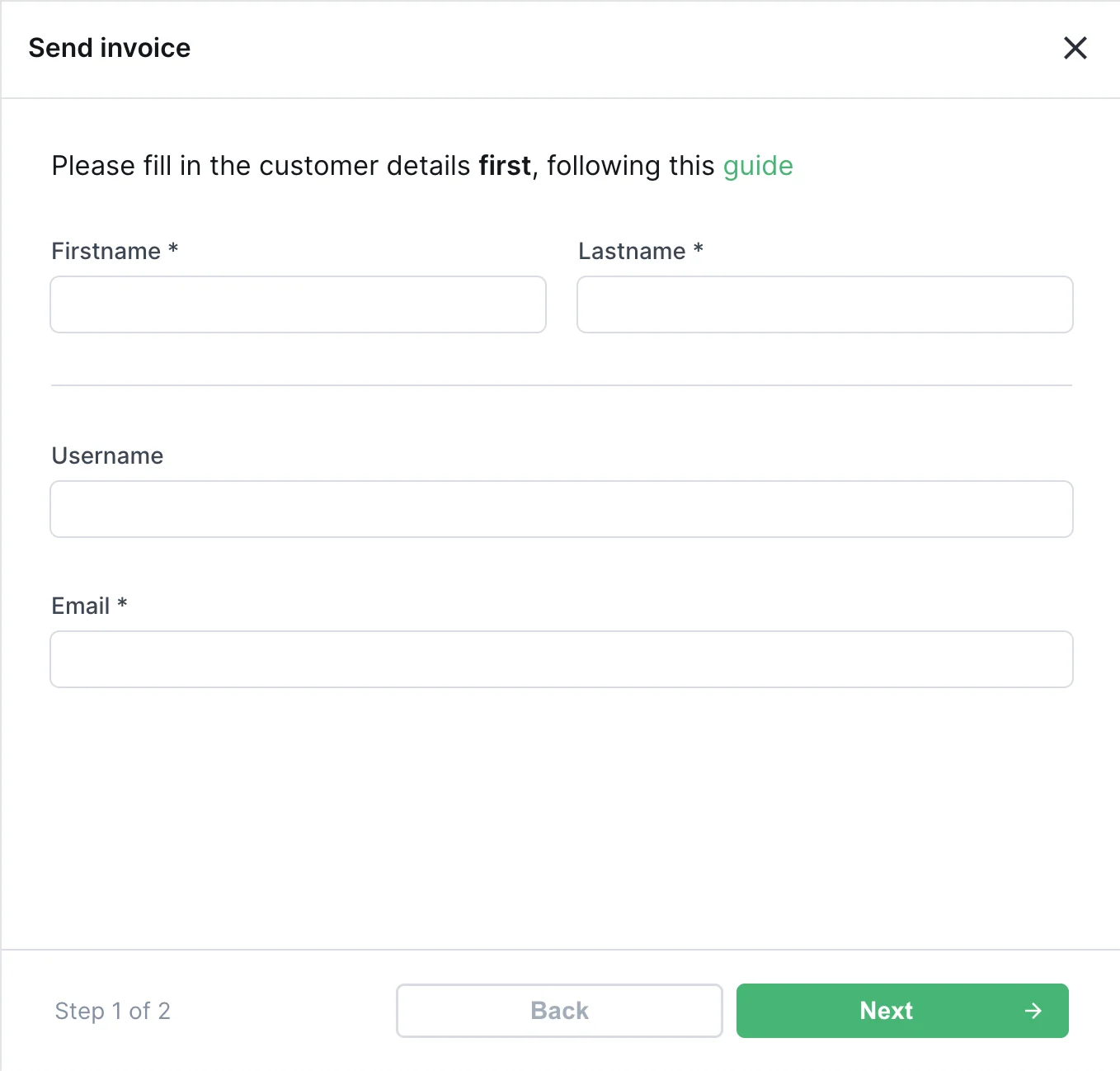
			  content: '<h3>Please fill in the customer details <b>first</b>, following this <a href="https://how-to-invoice.doc.example">guide</a></h3>'
			},
			{
			  type: 'Layout',
			  component: 'Row',
			  fields: [find_field_by_name.call('firstname'), find_field_by_name.call('lastname')]
			},
			{ type: 'Layout', component: 'Separator' },
			find_field_by_name.call('username'),
			find_field_by_name.call('email'),
		  ]
		},
		{
		  type: 'Layout',
		  component: 'Page',
		  elements: [
			{
			  type: 'Layout',
			  component: 'HtmlBlock',
			  content: 'You may now enter his address details'
			},
			{
			  type: 'Layout',
			  component: 'Row',
			  fields: [find_field_by_name.call('city'), find_field_by_name.call('zip code')]
			},
			find_field_by_name.call('country'),
		  ]
		}
	  ]
	end

	action 'Send invoice',
	  type: 'single',
	  fields: [
		{
		  field: 'firstname',
		  type: 'String',
		  is_required: true,
		},
		{
		  field: 'lastname',
		  type: 'String',
		  is_required: true,
		},
		{
		  field: 'username',
		  type: 'String',
		},
		{
		  field: 'email',
		  type: 'String',
		  is_required: true,
		},
		{
		  field: 'country',
		  type: 'Enum',
		  enums: [],
		},
		{
		  field: 'city',
		  type: 'String',
		  hook: 'on_city_change',
		},
		{
		  field: 'zip code',
		  type: 'String',
		  hook: 'on_zip_code_change',
		},
	  ],
	  hooks: {
		load: proc { |context| apply_layout(context[:fields]) },
		change: {
		  'on_city_change' => proc { |context| apply_layout(context[:fields]) },
		  'on_zip_code_change' => proc { |context| apply_layout(context[:fields]) },
		}
	  }
end
The resulting action form will be:

Making a form dynamic with hooks

Business logic often requires your forms to adapt to its context. Forest makes this possible through a powerful way to extend your form’s logic. To make Smart Action Forms dynamic, we’ve introduced the concept of hooks: hooks allow you to run some logic upon a specific event. The load hook is called when the form loads, allowing you to change its properties upon load. The change hook is called whenever you interact with a field of the form.

Prefill a form with default values

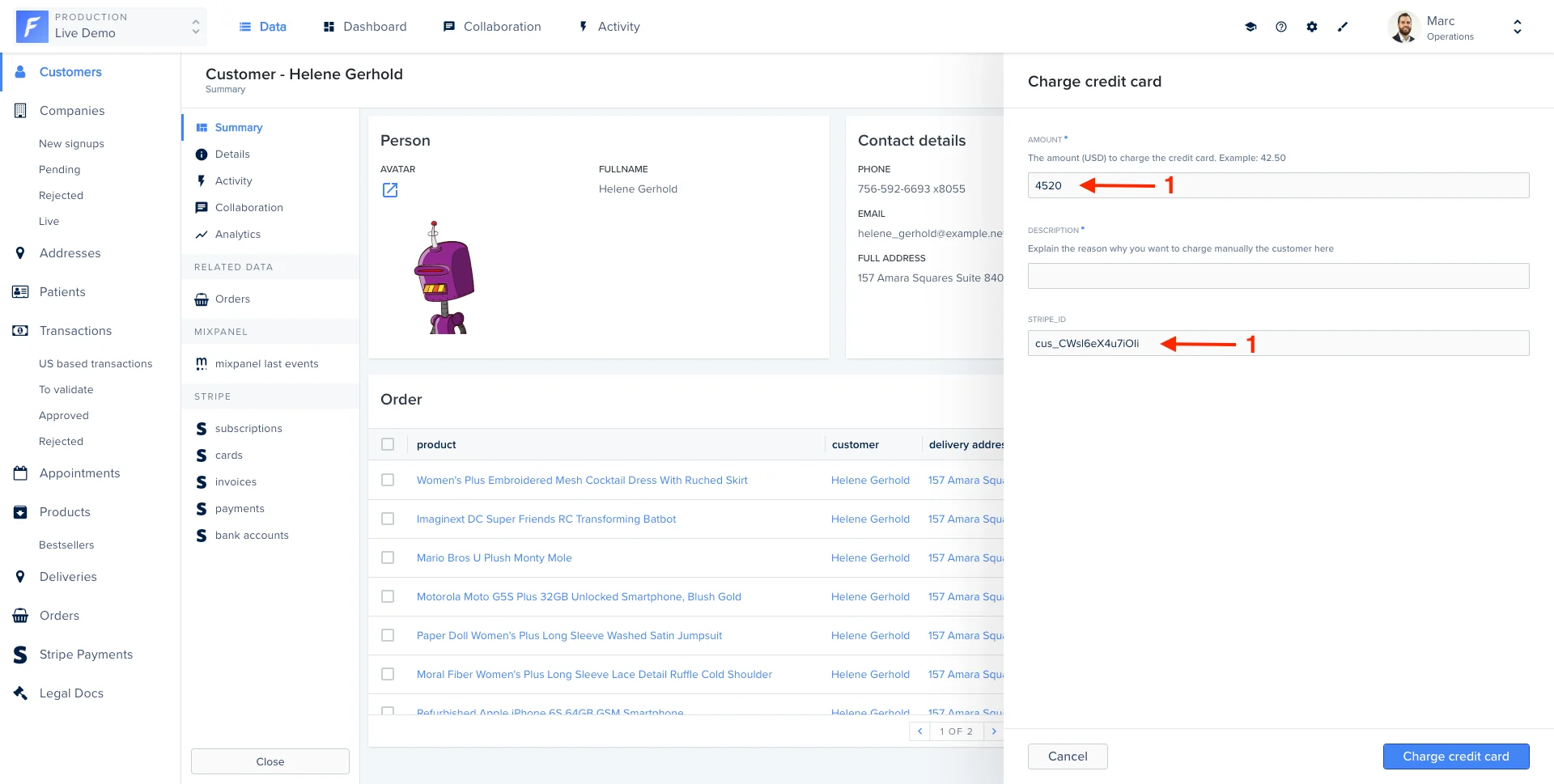
Forest allows you to set default values of your form. In this example, we will prefill the form with data coming from the record itself (1), with just a few extra lines of code.
class Forest::Customers
  include ForestLiana::Collection

  collection :Customers

  action 'Charge credit card',
    type: 'single',
    fields: [{
      field: 'amount',
      isRequired: true,
      description: 'The amount (USD) to charge the credit card. Example: 42.50',
      type: 'Number'
      }, {
      field: 'description',
      isRequired: true,
      description: 'Explain the reason why you want to charge manually the customer here',
      type: 'String'
      }, {
      # we added a field to show the full potential of prefilled values in this example
      field: 'stripe_id',
      isRequired: true,
      type: 'String'
    }],
    :hooks => {
      :load => -> (context) {
        amount = context[:fields].find{|field| field[:field] == 'amount'}
        stripeId = context[:fields].find{|field| field[:field] == 'stripe_id'}

        amount[:value] = 4520;

        id = context[:params][:data][:attributes][:ids][0];
        customer = Customers.find(id);

        stripeId[:value] = customer['stripe_id'];

        return context[:fields];
      }
    }
    ...
end

Making a field read-only

To make a field read only, you can use the isReadOnly property:
NameTypeDescription
isReadOnlyboolean(optional) If true, the Smart action field won’t be editable in the form. Default is false
Combined with the load hook feature, this can be used to make a field read-only dynamically:
actions 'Send invoice',
  type: 'single',
  fields: [
        {
          field: 'country',
          type: 'Enum',
          enums: []
        },
        {
          field: 'city',
          type: 'String',
          hook: 'oncityChange'
        },
        {
          field: 'zip code',
          type: 'String',
          hook: 'onZipCodeChange'
        },
      ],
  hooks: {
      :load => -> (context){
        country = context[:fields].find{|field| field[:field] == 'country'}

        id = context[:params][:data][:attributes][:ids][0];
        customer = Customers.find(id);

        country[:enums] = getEnumsFromDatabaseForThisRecord(customer)

        return context[:fields]
      },
      :change => {
        'oncityChange'=> -> (context){
          zipCode = context[:fields].find{|field| field[:field] == 'zip code'}

          id = context[:params][:data][:attributes][:ids][0];
          customer = Customers.find(id);

          zipCode[:value] = getZipCodeFromCity(
            context[:record],
            context[:context][:changed_field][:value]
          )

          return context[:fields]
        },
        'onZipCodeChange'=> -> (context) {
          city = context[:fields].find{|field| field[:field] == 'city'}

          id = context[:params][:data][:attributes][:ids][0];
          customer = Customers.find(id);

          city[:value] = getCityFromZipCode(
            context[:record],
            context[:context][:changed_field][:value]
          )

          return context[:fields]
        },
      },
  }

How does it work?

The hooks property receives a context object containing:
  • the fields array in its current state (containing also the current values)
  • the request object containing all the information related to the records selection. Explained here.
  • the changedField is the current field who trigger the hook (only for change hook)
fields must be returned. Note that fields is an array containing existing fields with properties described in this section.
If you want to use a widget inside of a hook, you’ll need to use the following syntax on your field:
  • For a text area, use { widgetEdit: 'text area editor', parameters: {} }
  • For a boolean, use { widgetEdit: 'boolean editor', parameters: {} }
  • For a date or a dateonly, use { widgetEdit: 'date editor', parameters: {} }
  • For a file, use { widgetEdit: 'file picker', parameters: {} }
To dynamically change a property within a load or change hook, just set it! For instance, setting a new description for the field city:
:hooks => {
  :change => {
    'onFieldChanged' => -> (context) {
      [...]
      context[:fields].push({
        field: 'another field',
        type: 'Boolean',
      });
      return context[:fields];
    }
  }
}
We added the changedField attribute so that you can easily know what changed.
Note that you may add a change hook on a dynamically-added field. Simply use the following syntax:
:hooks => {
  :change => {
    'onFieldChanged' => -> (context) {
      [...]
      context[:fields].push({
        field: 'another field',
        type: 'Boolean',
        hook: 'onAnotherFiledChanged',
      });
      return context[:fields];
    },
    'onAnotherFiledChanged' => -> (context) {
      # Do what you want
      return context[:fields];
    }
  }
}

Get selected records with bulk action

When using hooks with a bulk Smart action, you’ll probably need te get the values or ids of the selected records. See below how this can be achieved.
class Forest::Customers
  include ForestLiana::Collection

  collection :Customers

  action 'Some action',
    type: 'bulk',
    fields: [
      {
        field: 'country',
        type: 'String',
        is_read_only: true
      },
      {
        field: 'city',
        type: 'String'
      },
    ],
    :hooks => {
      :load => -> (context) {
        country = context[:fields].find{|field| field[:field] == 'country'}

        ids = ForestLiana::ResourcesGetter.get_ids_from_request(context[:params], context[:user]);
        customers = Customers.find(ids);

        country[:value] = '';
        country[:is_read_only] = false;

        # If customers have the same country, set field to this country and make it not editable
        if customers_have_same_country(customers)
          country[:value] = customers.country;
          country[:is_read_only] = true;
        end

        return context[:fields];
      },
    },
end